Email is a great way to communicate with staff, colleagues, business partners, vendors, contractors, etc. However, normal email communications are not a very secure method of communication especially when sensitive data needs to be sent. The preferred method to securely send an email containing sensitive data is to use encryption.
Encryption allows for email communication to be secured between the sending and receiving parties. Encrypting an email allows the sender to transfer data that would not otherwise be appropriate to send via email. Sensitive data up to and including Level 3 can be safely sent via encrypted email using the steps on this page. Click below for instructions on how to use either the Outlook Desktop Client or the Outlook Web App to send an encrypted email.
To send an encrypted email in the outlook desktop client, follow these steps:
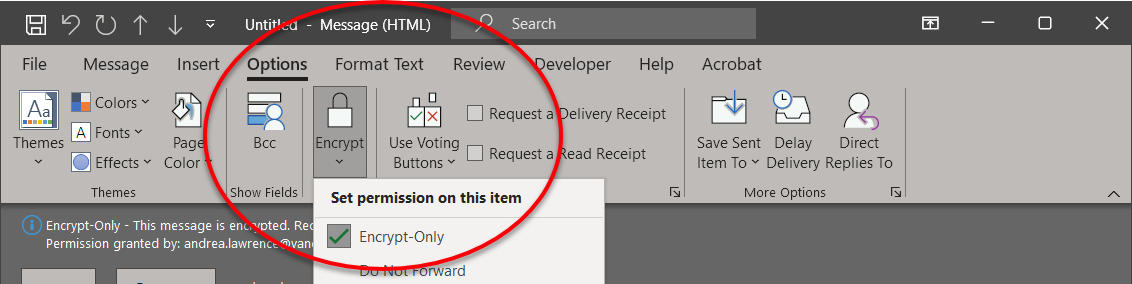
- While composing a new message, in the top ribbon, click on the 鈥淥ptions鈥� tab
- In the 鈥淥ptions鈥� ribbon, click on the 鈥淓ncrypt鈥� button and select "Encrypt-Only"
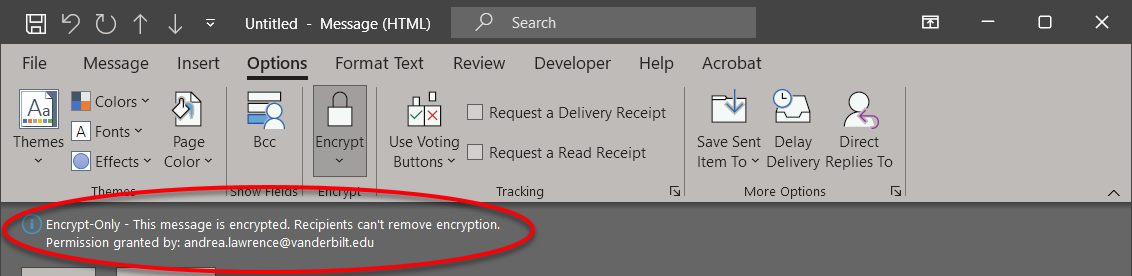
- Once you select the 鈥淓ncrypt-Only鈥� option, ensure that the text highlighted by the arrow below appears in the email you are composing.
- That鈥檚 all there is to it! Your email is now encrypted and the contents can only be read by the person(s) you are sending it to.
To send an encrypted email in the Outlook Web App, follow these steps:
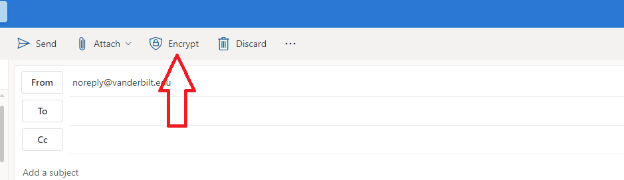
- While composing a new message, click the 鈥淓ncrypt鈥� button above the from email address field.
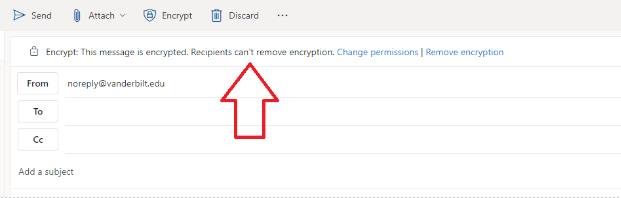
- Ensure that the text shown above the arrow in the next image appears on your email.
- That鈥檚 all there is to it! Your email is now encrypted and can only be read by the person(s) you are sending it to.

Not sure how to start?
Get in touch if you don鈥檛 know where to begin, you can鈥檛 find the guidance needed on the website, or if you just want to learn more. The Office of Cybersecurity has subject matter expertise and is here for Vanderbilt community to discuss security questions or concerns.